









Apart from paper and wood prints, all our products can be cleaned with a damp microfibre cloth. You can use glass cleaner on glass products and plastic protection spray, such as Vuplex, on acrylic prints.
Care and use
If you are looking to hang your photo outdoors or in a damp space, we’d recommend choosing either our metal or glass print for this purpose. Both materials can withstand heat and moisture.
Common questions
If you would like to use photos from social media, please keep in mind these images will be much smaller and lower quality than the original found on your camera or phone. While these images are perfectly acceptable for smaller print sizes, we’d recommend using the original photo when possible.
a
I am a photographer and would like to offer prints to my customers. Can you ship to them directly?
We’re happy to work with photographers and we’re able to ship directly (blind ship) to your customers, if needed.
Please get in touch if you have regular needs for prints and we can offer business pricing.
All prints are made by us – no third parties are involved. We’re located in Central Finland and ship EU-wide.
We offer discounts periodically. Please follow us on social media or sign up for our newsletter for notifications of our campaigns.
For volume orders, please contact us for a quote.
File preparation and processing
Since screens are backlight they will naturally be brighter than printouts. To account for this we recommend adjusting your screen to roughly 50% brightness when editing your photos.
Softproofing allows you to see a representation of your photos on our different print materials. Different prints materials will have different color capabilities which may affect how you edit your photo or which material works best for each particular photo.
How to Softproof:
For Mac:
- Add our ICC profiles to the following directory.
- Our ICC profiles can be found here.

For Windows:
- Right-click the profile and select “install profile”.
- In Photoshop open your image you wish to proof and select “View” —> “Proof Setup” —> “Custom” to open soft proofing dialog.
- Lightroom does not support CMYK profiling, but does support RGB. Paper prints use RGB profiles while other products use CMYK profiles. We recommend using Photoshop since it supports both RGB and CMYK color spaces.
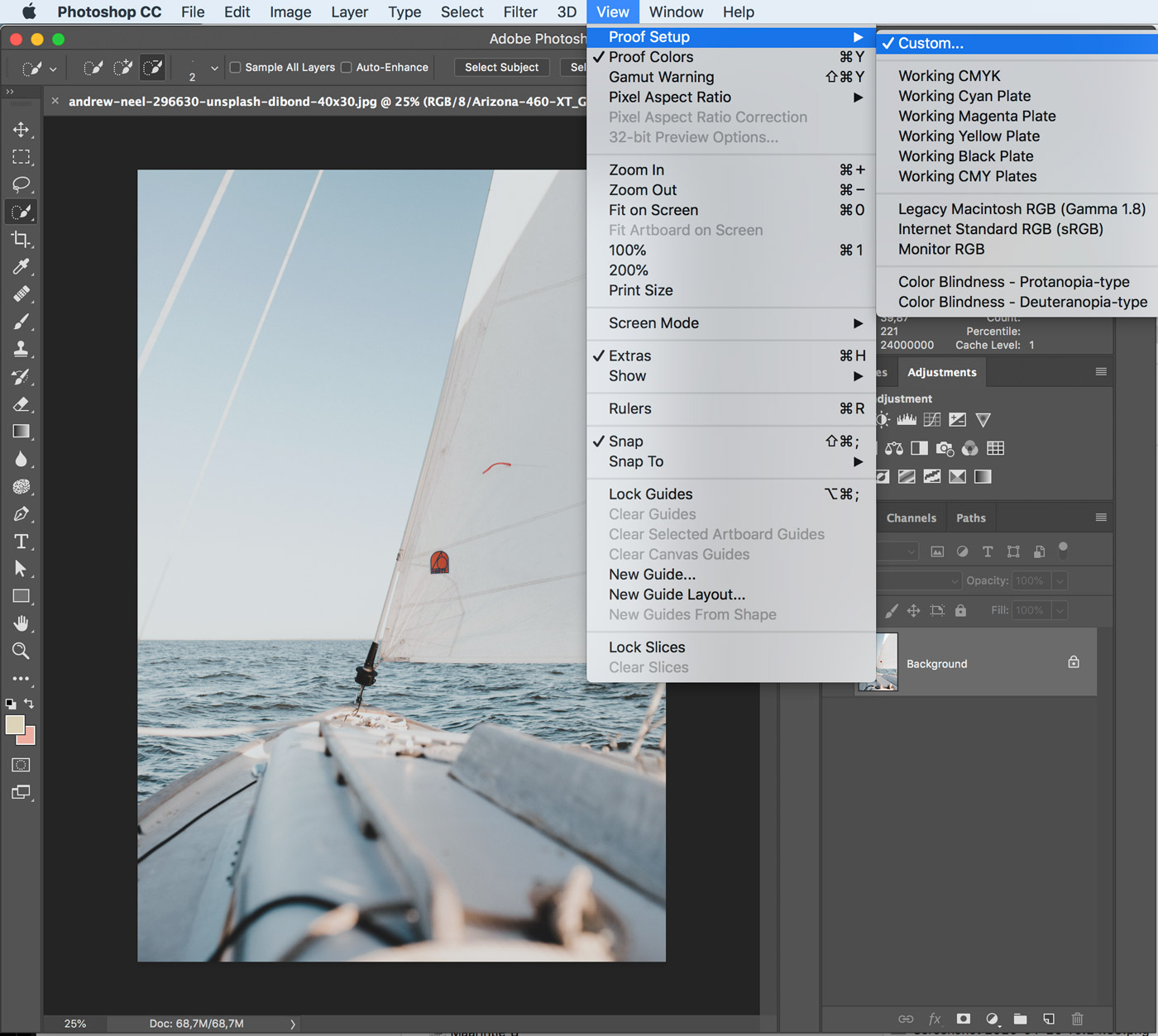
- In the field “Device to Simulate” select one of our profiles you wish to soft proof, select “preview” and click ok.
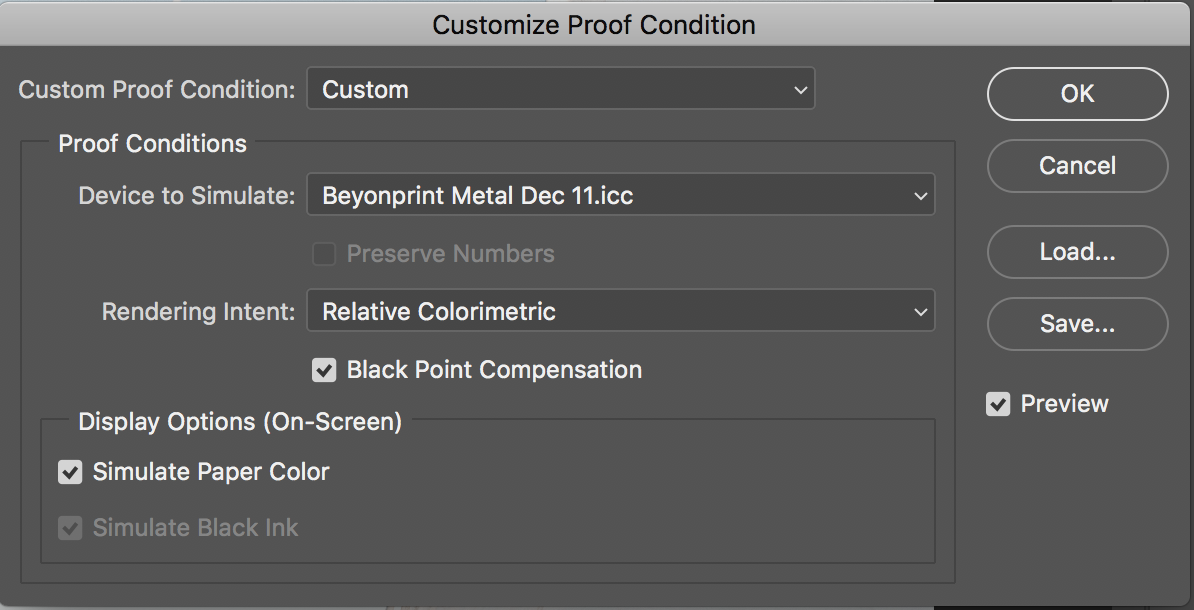
Please do not embed our printer ICC profiles into your photo. These profiles are meant for simulation. For best results, keep your photo in RGB colour space with either colour profile sRGB or Adobe RGB 1998 embedded.
To ensure prints are a close match to your screen it helps to have a calibrated monitor. Since monitors are backlit, often times this means prints may come out darker than what is seen on screen. Turning down the brightness of your monitor when editing your photos is a good practice to help match what to be expected from a print.
If colour accuracy is your most important requirement, we recommend ordering your photos on our Fine art or Luster paper products. Both of these papers can reproduce the most demanding colours with high accuracy.
If you’d like to order our other products, place a test order for a small size. If you like the results, you can then order a larger size with confidence.
*All our products are custom colour profiled to ensure the highest quality possible. Please find our custom colour profiles below. You can use these for soft proofing.
- Metal-Beyondprint
- Glass-Beyondprint
- Wood-Beyondprint
- Acrylic-Beyondprint
- Galleryframe-Beyondprint
- Fine Art-Beyondprint
- ProLuster-Beyondprint
- Premium Matt Poster Paper-Beyondprint
Sharpening is always image dependant. Most printed images benefit from moderate sharpening. Always evaluate your image by zooming in to see whether your image could benefit.
300 DPI is the best resolution possible. As you move up in print size, the DPI will decrease. This is not a problem as you will naturally view your image from further away. The larger you would like to have your photos printed, the greater the number of pixels should be. While you can add pixels to your image to get 300 DPI, we normally do not recommend this as the results are not always predictable and files will become unnecessarily large.
Photos straight from your camera will have the best resolution, while photos coming from social media will have moderate to poor resolution. If you’re photos are from social media we recommend small and medium sized prints. If you’ve shot your photos from a DSLR or even modern camera phone, you can print at maximum sizes with impressive results!
For the more technically inclined, below is an general overview estimating quality in relation to pixels:
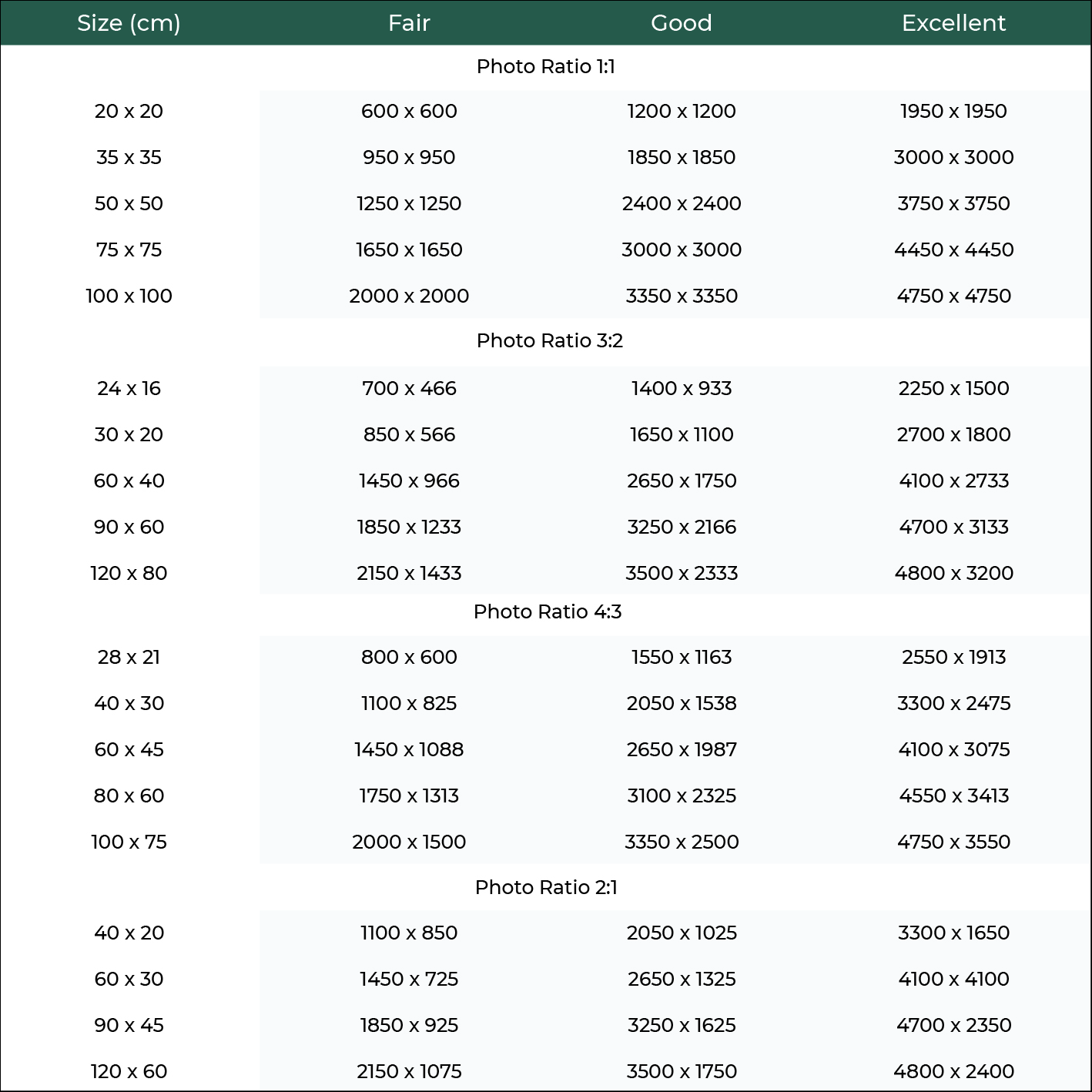
Please find our recommended guidelines below:
– We accept most common file formats: .jpg, .pdf, .tiff, and .png.
– Embedded colour space should be sRGB or Adobe RGB 1998.
– There is no need to adjust print size prior to uploading as our software will render each image at the optimum resolution.
– You can add 2-3mm bleed for paper prints, although it is not necessary, unless you have important details at the very edges of your photo, such as a signature or frame. For example, if you upload a 50x50cm image we will print at 50,2 x 50,2cm and cut to 50x50cm.
– All files are individually checked before printing to ensure they are suitable for printing and can be produced in the highest quality. If you’re not certain about your files, feel free to contact us and we’ll check your files for you.
Ordering
To start with, all you need is a digital image file. For best quality, please use an original file from your camera. Avoid using files copied from the Internet. You can create a photo product by choosing product type, size and finally uploading your image. Before finalising your order, you can crop your image if necessary. Please note that any colour differences in preview are due to browser viewing and will not affect your image output or simulate the final product.
We accept most common file formats: .jpg, .pdf, .tiff, and .png. Maximum upload size for one image is 120 MB. If your file is larger than this you can also order without uploading your image to our website. You can still checkout through our website and then send your images separately through Dropbox or Wetransfer.com
We also process orders via email. Files can be sent via cloud service or as email attachment, depending on size. Examples of cloud services: Dropbox, Google Drive, OneDrive etc. If you have no cloud account set up, send larger files for free through Wetransfer.com. Email orders can be paid via bank transfer, Paypal or Wise.
Yes, absolutely! Send us an inquiry of what you are looking for and we can confirm options and price. If you are not sure on the size, you can always send us your file and we can give a recommendation.
Production and shipping
Standard shipping can take anywhere from 3-8 working days, depending on destination.
Please contact us in advance if you have an urgent order and would need expedited shipping (UPS). Standard shipping methods are only available on checkout.
Production time depends on the material and the size of the print, but most orders are ready for shipping within 5-7 working days from the order date.
Terms and privacy
Beyondprint saves personal details in processing orders and to provide customer service. Beyondprint collects the following information:
• Name
• Phone number
• Address
• File to be printed
Beyondprint never gives any information to third parties and treat all information with absolute confidentiality. All registered information is located on a password-protected server. Purchaser can request to know all personal details that have been recorded and ask details to be deleted at any time. Website and registered information is maintained by Primo Media ((2617056-9). Please send inquiry or ask information to be deleted by email to info@beyondprint.eu.
Image files
Purchaser can upload files through an image uploader with the purpose of buying a print service from Beyondprint. All files are only used to offer said service and all rights of ownership remain with Purchaser. Files are saved on a password secured server and not shared with any third parties. File content is regularly deleted and not kept for any other purpose than if reprints are needed.
Copyright
Beyondprint is not responsible for the content of any files submitted by Purchaser. It is for Purchaser to ensure that image content does not infringe on any copyrights or violate any law. Beyondprint reserves the right to report any such instances to the applicable authorities.
Payment safety
All payments are handled by Payment Trust Finland Ltd (an authorized payment institution supervised by the Financial Supervisory Authority (FIN-FSA).
All data transfer and money transactions are SSL secured meaning that no external party can see your personal information. Beyondprint is not privy to your payment or card details.
Cookies
Beyondprint uses cookies to improve the online store and to offer a good shopping experience. Cookie is a small piece of data that is saved on a computer and makes ordering possible. Purchaser can determine cookie policy on browser settings. Beyondprint automatically assumes Purchaser accepts cookies when visiting the online store.
Google Analytics cookies
Beyondprint uses Google Analytics service to improve online store’s user experience and to follow results from website development. Cookies anonymously record traffic on the website. Read more about Google data privacy and security ».
If you are unhappy with your order in any way, please contact us in 14 days and we will remedy the situation as quickly as possible.
In case of damaged items in shipping, please send us an email directly with photographs of packaging, label and damaged item.
Credit Card Payment or Paypal payment via Paypal
Please read full User Agreement here: https://www.paypal.com/us/webapps/mpp/ua/useragreement-full
Card Payments by Visa, Visa Electron, Mastercard or Business Eurocard
Paying with a credit or debit card is always easy and safe in our web store. Card payments in our webstore are provided by Svea Payments Ltd in cooperation with Checkout Finland Oy and Bambora AB. During the transaction, all card information will be handled through a secure connection. Card numbers are not recorded in Svea Payments Ltd’s or the webstore’s systems; the card data is processed by the technical service provider Checkout Finland Oy.
Card Payments and MobilePay by Visa, Visa Electron, Mastercard or Business Eurocard
Paying with a credit or debit card is always easy and safe in our web store. Card payments and MobilePay payments in our webstore are provided by Svea Payments Ltd in cooperation with Checkout Finland Oy and Bambora AB. During the transaction, all card information will be handled through a secure connection. Card numbers are not recorded in Svea Payments Ltd’s or the webstore’s systems; the card data is processed by the technical service provider Checkout Finland Oy.
Contact information for the payment service provider:
Svea Payments Ltd
Business ID: 2121703-0
Mechelininkatu 1A
00180 Helsinki
Tel. (09) 42 41 7040
E-mail: customerservice.payments@svea.fi
www.sveapayments.fi/en
Terms and conditions
All purchases from Beyondprint online store shall be governed by these Terms and Conditions. Term ‘Purchaser’ will be used in these terms for consumer/customer and ‘Beyondprint’ for the online store. Purchaser acknowledges that these Terms are applicable in any final sales contract (Sales agreement) that Purchaser and Beyondprint might enter into. Beyondprint reserves the right to change these Terms at any given time with sole discretion and without prior notice.
Ordering
All prices displayed on this website include Value Added Tax of 24%. Final price with delivery fee will be displayed at the checkout. After receiving payment, order confirmation is automatically sent to Purchaser’s email address. When order has been forwarded to delivery agent, Purchaser shall receive a notification with electronic shipping details.
Lead times can vary from general 5-7 days depending on order volume and materials. Purchaser has the right to terminate contract if delivery time is longer than 30 days and no other lead time is agreed.
Order cancellation
Beyondprint is unable to accept cancellation after order has been made due to production timelines.
Delivery
Standard delivery times vary from 3-7 working days within the EU. Beyondprint is unable to guarantee exact delivery times or be held accountable for any delivery delays.
All damaged goods during shipping have to be reported directly in writing and with photographic evidence of damaged item, packaging and slip to Beyondprint’s customer service. Damaged item and original packaging have to be kept until further notice. Beyondprint will with Purchaser’s decision either replace or refund the order without any expense.
Payment service
The payment service between Beyondprint and consumers is offered by Svea Payments Ltd (Company registration number 2121703-0) in co-operation with banks and credit institutions. You as a consumer are not required to register or pay extra costs for using the payment service. Svea Payments Ltd is an authorized payment institution supervised by the Financial Supervisory Authority (FIN-FSA). All data transfer and money transactions are SSL secured meaning that no external party can see your personal information. Svea Payments Oy (or our auxilary business name Maksuturva Group Oy) will show as the recipient of the payment.
Svea Payments Ltd
Business ID: 2121703-0
Mechelininkatu 1A
00180 Helsinki
Tel. (09) 42 41 7040
E-mail: customerservice.payments@svea.fi
www.sveapayments.fi/en